PDF Plugins home

PDF Calculator Tape Guide

What Is a PDF Calculator Tape? A Guide for Accountants

A PDF calculator tape helps accountants document calculations directly inside PDF workpapers, making review easier, clearer, and more defensible.

Accountants often need to show how a number was calculated inside accounting workpapers or tax workpapers, without jumping between Excel, a desktop calculator, handwritten notes, and the PDF. A calculator tape in PDF keeps that math trail close to the document used for PDF workpaper review.

Scriptor gives firms a practical calculator tape for accountants, alongside PDF workpaper software and review tools built for Adobe Acrobat Pro workflows.

Scriptor\u2122 calculator tape tool for PDF workpapers

Accounting Workpapers

Why Calculator Tapes Matter in Accounting Workpapers

Calculator tapes preserve the math trail behind a workpaper number. Instead of showing only the final amount, they show the entries, subtotals, notes, and total that support the conclusion on the page.

That context helps reviewers follow the calculation without sending preparers back to a separate spreadsheet, calculator, or handwritten note. When the explanation is visible in the PDF, review comments can focus on the work instead of asking where the support lives.

Clear calculator tapes also make accounting workpapers easier to support later. They reduce back-and-forth during review and give preparers a cleaner way to explain how a total was reached.

The Old Workflow

The Problem with Traditional Calculator Tapes

Paper or desktop calculator tapes are familiar, but they are disconnected from the PDF being reviewed. The support may exist, but it is not naturally tied to the page, bookmark, or workpaper section where the number appears.

Excel is useful for complex schedules and larger datasets, but it often sits outside the reviewed document. Manually typing calculation notes into a PDF is also slow and error-prone, especially when amounts change during review.

Static annotations can be hard to update later. If a reviewer asks for clarification or a number changes, the preparer may have to recreate the support instead of editing the original tape.

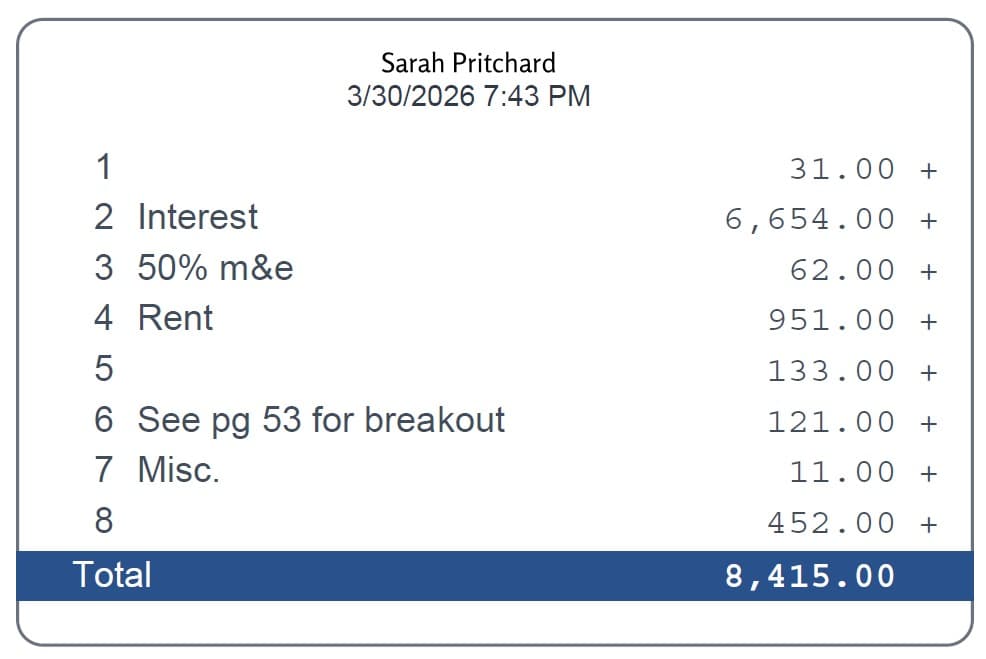
Calculator tape inserted into a PDF workpaper

The Scriptor Workflow

How Scriptor Adds Calculator Tapes Directly to PDFs

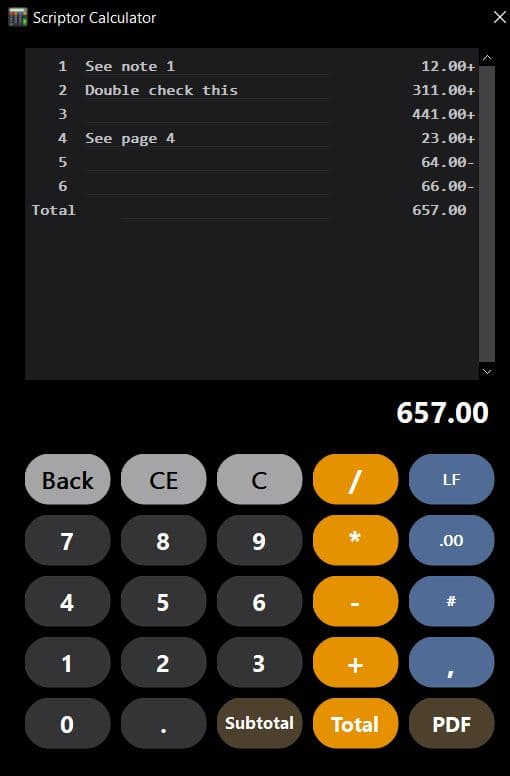
Scriptor keeps the calculation workflow on screen, then lets accountants print a clean, editable tape directly onto the PDF workpaper.

On-screen calculator workflow

  • Easy 10-key entry
  • Correct numbers on the screen with an auto-updating total
  • Add notes line by line to bring clarity
  • Insert and delete lines on the screen as needed, even if a total is already printed
  • Resize the calculator tool to suit your preference

Printed tape workflow

  • Print tapes with a click of a button
  • Resize the printed tape to match any document layout
  • Double-click to edit, recalculate, and reprint instantly
  • Annotate directly on the tape using Scriptor MarkUp or native Adobe Acrobat Pro tools
  • Use clean, right-justified tape formatting with name and timestamp for audit clarity

Comparison

PDF Calculator Tape vs. Excel vs. Manual Notes

Different tools still have a place in accounting review. The question is where the calculation support should live when the reviewed document is a PDF.

Method
Best For
Limitation
Excel
Complex schedules and large datasets
Separate from the PDF workpaper
Manual PDF notes
Quick explanations
Easy to mistype or omit calculation detail
Desktop calculator tape
Familiar 10-key workflow
Disconnected from the reviewed PDF
Scriptor PDF calculator tape
Documented calculations inside PDF workpapers
Requires Scriptor plugin

Use Cases

Common Uses for PDF Calculator Tapes

  • Tax return workpaper calculations
  • Audit workpaper support
  • Reconciling totals
  • Adding supporting math to bookmarked PDF sections
  • Review notes and explanations
  • Documenting adjustments

Editable Support

Why Accountants Prefer Editable PDF Calculator Tapes

Workpapers change during review. Reviewers often ask for clarification, preparers add context, and totals may need to be adjusted as the file moves forward.

Editable and reprintable tapes keep that workflow practical. With Scriptor, accountants can double-click a tape, edit the calculation, recalculate it, and reprint it without recreating the support from scratch.

Teams comparing PDF review tools can also explore PDF markup tool features and a TicTie Calculate alternative for broader workpaper workflows.

FAQ

Questions about calculator tapes in PDFs

What is a PDF calculator tape?

A PDF calculator tape is calculation support placed directly inside a PDF workpaper, so the math trail stays with the page being prepared or reviewed.

Why do accountants use calculator tapes in PDFs?

Accountants use calculator tapes in PDFs to show how a number was calculated, help reviewers follow the workpaper, and reduce separate notes or files.

Can Scriptor calculator tapes be edited after they are printed?

Yes. Scriptor lets accountants double-click a printed tape to edit, recalculate, and reprint it when the workpaper changes.

Does Scriptor work inside Adobe Acrobat Pro?

Yes. Scriptor is built for accountants who work in Adobe Acrobat Pro and want calculator tapes, markups, sign-offs, and workpaper tools inside that PDF workflow.

Try the Tool

Try Scriptor's PDF Calculator Tape Tool

Scriptor helps accountants create clean, editable calculator tapes directly inside PDF workpapers. Start a free trial and see how it fits your review workflow.

Adobe and Acrobat Pro are trademarks of Adobe. Scriptor is not affiliated with or endorsed by Adobe.

PDF Calculator Tape for Accountants | Scriptor™